原件存檔 Original files吳哲宇 Che-Yu Wu

高中畢業的暑假(2013 年 7 月)The summer after high school (July 2013)

PicturetoWord:用一段文字自己的字把圖印出來PicturetoWord: print a picture with the characters of a piece of text

程式的做法分兩步。先量字:把文字框裡每個不同的字,用 100 像素的粗體新細明體畫在 100 × 100 的白底上,把所有像素的灰階加起來,得到這個字有多黑,0 是全黑、255 是全白。再印圖:圖片縮到 500 像素以內,每個像素算灰階,挑一個黑度最接近、又不比像素更黑的字,一列像素接成一行字,最後存成 Result.txt,叫記事本打開,要把字型大小調到 1 或 3,圖才看得出來。程式裡有一個「對比度」滑桿,把每個字和白色之間的差距放大,預設是 1.5 倍。

預設的字是 12 個:全形空白、「,」「。」、一、十、下、米、田、哲、期、龍、䶵。程式碼裡被註解掉的舊版是手動分級:大於 250 用全形空白,大於 200 用「‧」,往下依序是一、十、米、田、哲、期、龍,最黑用䶵。後來改成自動量。

The program works in two steps. First it measures the characters: every distinct character in the text box is drawn in 100-pixel bold 新細明體 on a 100 × 100 white bitmap, and the greyscale of all its pixels is added up to give how dark it is, 0 being black and 255 white. Then it prints the picture: the image is shrunk to within 500 pixels, every pixel gets a grey value, the character whose darkness is closest, and not darker than the pixel, is chosen, a row of pixels becomes a line of characters, and the result is saved as Result.txt and opened in Notepad, where the font size has to be set to 1 or 3 for the picture to show. A "contrast" slider scales up the gap between each character and white, 1.5 times by default.

The default characters are 12: the full-width space, ",", "。", 一, 十, 下, 米, 田, 哲, 期, 龍 and 䶵. The commented-out older version in the code was a hand-made scale: above 250 a full-width space, above 200 "‧", then 一, 十, 米, 田, 哲, 期, 龍 going down, and 䶵 for the darkest. Later it was replaced by automatic measurement.
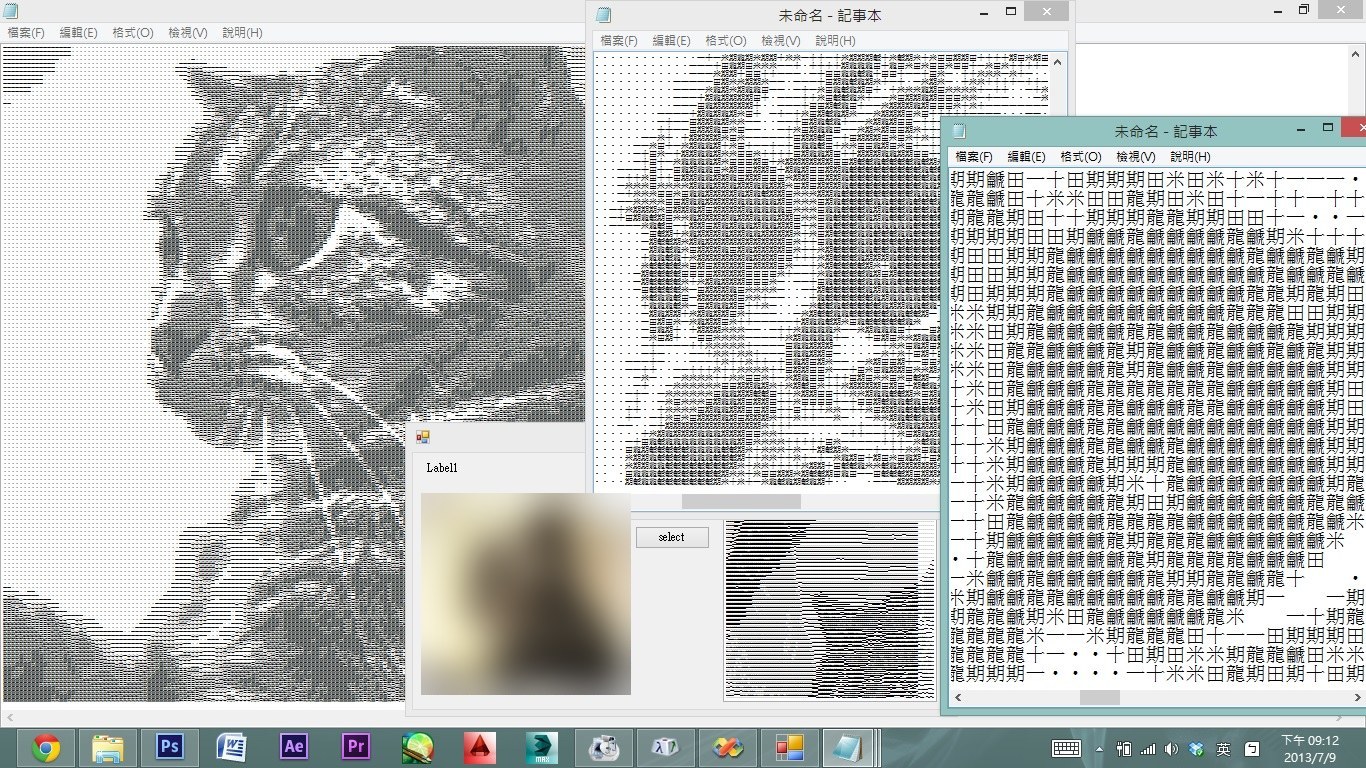
Windows 桌面上三個記事本視窗,裡面是用字印出來的一隻貓的側臉,前面有程式視窗顯示原圖
2013 年 7 月 9 日晚上 9:12 的畫面:三個字型大小不同的記事本視窗(右下角時鐘)(程式視窗裡的原始照片來源不明,已打霧)The screen at 9:12 pm on 9 July 2013: three Notepad windows at different font sizes (from the clock at the lower right) (the source photo in the program window is of unknown origin and has been blurred)
    Function condark(ByVal R, ByVal G, ByVal B) As Integer
        Return ((R * 299) + (G * 587) + (B * 114)) / 1000
    End Function
    Function gettextdark(ByVal texta As String)
        Dim ff As Font = New Font("新細明體", 100, FontStyle.Bold, GraphicsUnit.Pixel)
        '設定單位 GraphicsUnit.Pixel
        Dim bmp As New Bitmap(100, 100)
        Dim ga As Graphics = Graphics.FromImage(bmp)
        ga.Clear(Color.White)
        ga.DrawString(texta, ff, Brushes.Black, -17, 0)
        bmp.Save(temptextpath, System.Drawing.Imaging.ImageFormat.Bmp)
        …(把畫好的字的灰階加總、換算成 0 到 255,略)
Form1.vb:condark 把 RGB 換成灰階,gettextdark 把一個字畫出來量黑度。Form1.vb: condark turns RGB into grey, and gettextdark draws one character to measure its darkness.
        For i As Integer = 255 To 0 Step -1
            If texts(i) <> Nothing Then
                lasttext = texts(i)
            Else
                texts(i) = lasttext
            End If
        Next
    …
            For y = 0 To image1.Height - 1
                For x = 0 To image1.Width - 1
                    Dim pixelColor As Color = image1.GetPixel(x, y)
                    Dim chara As String = texts(condark(pixelColor.R, pixelColor.G, pixelColor.B))
    …
                    words += chara
                Next
                words += vbNewLine
Form1.vb:沒被量到的灰階借用下一個較白的字,和照每個像素的灰階挑字。Form1.vb: grey levels no character was measured for borrow the next lighter character, and each pixel picks its character.

bin/Debug 裡留著一次輸出:Result.txt 有 194 行,每行 200 個字,對應 200 × 194 的 tempbmp.bmp(一隻貓的照片),用的就是上面那 12 個字。

One output is left in bin/Debug: Result.txt has 194 lines of 200 characters each, matching the 200 × 194 tempbmp.bmp (a photo of a cat), and it uses the 12 characters above.